I am currently the Grants and Professional Development Coordinator for the California Technology Assistance Project in Region 10 (RIMS CTAP). I work out of the San Bernardino County Office of Education, supporting teachers and administrators in the effective implementation of instructional technology tools. Over the past several years, I have been involved in spearheading the development of several professional development programs in my region, including Integrating Technology for English Language Learners (iTELL), Technology Integration Coaching, Data Academies and a workshop series about the use of interactive technologies called Digital Classroom. In addition, I provide the “technology pieces” in our county Common Core training in English Language Arts.
Over the past two years, I have been involved in piloting and then serving on the Curriculum Committee for Leading Edge Certification for the Online and Blended Teacher, which is a 60 hour course in the pedagogy of online instruction. We see this as a first step towards a credential authorization to help ensure that teachers of online courses have the proper preparation and exposure to instructional strategies to be effective in the online environment. I coordinate the delivery of Leading Edge Certification in RIMS, and help to provide training for other LEC trainers around the state.
I am also an Adjunct Instructor at University of La Verne. I teach a class called "Learning Technologies for Educators", which is a required course for a teaching credential. I teach the class in a fully online environment, and I love exposing my students to educational applications of various Web 2.0 tools. I also like the fact that I am helping to dispel the myth that online courses are impersonal and lack communication and collaboration, as I have different student groupings on different projects, and model both synchronous and asynchronous communication tools.
I have a Bachelors of Science degree from Indiana State University in Elementary Education, and a Masters degree in Educational Technology from California State University, San Bernardino. My Masters project in 1997 involved helping districts write Technology Use Plans. Since then, I have received my administrative credential, and have worked in county administration for the past 10 years. I began the Doctor of Educational Technology program at Boise State University in Fall 2012, with an anticipated completion date of Spring, 2017. My primary areas of interest are online learning and the needs of English Language Learners in the online environment.
My interests outside of work and school include traveling, reading, gardening and cooking. I enjoy exploring different cultures and environments, and spending time in out-of-the-way “local” spots as I travel. With grown children, my husband and I now have more opportunities to explore areas we enjoy, such as Mexico, and visit places we’ve only dreamed about, such as Africa. My garden changes every year, but always starts out organized and ends up wild and overabundant. I try to implement at least 2-3 new recipes every month, and sometimes manage 2-3 in a given week. Everyone in my family is a Dodger fan, and I try to get to several games every year. And just in case I wasn't busy enough, I am currently training for a half-marathon!
A glimpse into my experiences learning and leading with educational technology.
Sunday, September 2, 2012
Thursday, August 30, 2012
Doctoral DIY
Today I read an article analyzing self-help dissertation advice books. First, who knew there were self-help books for writing your dissertation? I guess there's a DIY book for everything, but really?? Just for the fun of it, I checked YouTube, my normal place for DIY advice, and found that YouTube can also teach me how to write a dissertation! There are dozens of "classes" about writing a dissertation, and many more showing various candidates' actual defenses. An hour later, I can say I didn't find a single useful video. (Yes, an hour. It is YouTube after all.)
It seems that one factor all of these "how to" manuals have in common is the claim that, if you follow their steps exactly as written, you will automatically have success. That's a tough one for me, since I typically think the step by step directions on putting together a bookshelf are only broad guidelines. Although the bookshelf makers presumably have tested this thousands of times, I do not necessarily believe that their interpretation of the steps and the order makes the most sense.
A second common factor in these dissertation advice books is providing writing guidelines, again as a set of steps. Again, I don't see that working for me. I'm perfectly happy to start with a piece of writing that's in the middle of my topic, and build out from it. I write like a spider web, and suggesting that the only correct way to do a dissertation is to write in a line just rubs me the wrong way. I do believe that there are other people out there who also are non-linear who have successfully managed to get a doctorate degree, and who have not compromised their writing style in order to follow a recipe for success.
The third common element that really jumped out at me was that these self-help books don't truly address the complexities of writing. They deal with mechanics and grammar, structure and vocabulary, but seem to completely ignore voice, tone, and nuance as literary tools. Which implies that dissertation writing is a dry reporting process rather than an interpretive learning and sharing process. For anyone who knows me, it should come as no surprise that I am hoping my dissertation and defense more resembles Hans Rosling's way of sharing data!
I'm hoping that it will be okay for my dissertation to reflect my voice - I'm optimistic that the fact that my program shared this article with us is a sign of that!
It seems that one factor all of these "how to" manuals have in common is the claim that, if you follow their steps exactly as written, you will automatically have success. That's a tough one for me, since I typically think the step by step directions on putting together a bookshelf are only broad guidelines. Although the bookshelf makers presumably have tested this thousands of times, I do not necessarily believe that their interpretation of the steps and the order makes the most sense.
A second common factor in these dissertation advice books is providing writing guidelines, again as a set of steps. Again, I don't see that working for me. I'm perfectly happy to start with a piece of writing that's in the middle of my topic, and build out from it. I write like a spider web, and suggesting that the only correct way to do a dissertation is to write in a line just rubs me the wrong way. I do believe that there are other people out there who also are non-linear who have successfully managed to get a doctorate degree, and who have not compromised their writing style in order to follow a recipe for success.
The third common element that really jumped out at me was that these self-help books don't truly address the complexities of writing. They deal with mechanics and grammar, structure and vocabulary, but seem to completely ignore voice, tone, and nuance as literary tools. Which implies that dissertation writing is a dry reporting process rather than an interpretive learning and sharing process. For anyone who knows me, it should come as no surprise that I am hoping my dissertation and defense more resembles Hans Rosling's way of sharing data!
I'm hoping that it will be okay for my dissertation to reflect my voice - I'm optimistic that the fact that my program shared this article with us is a sign of that!
Friday, August 24, 2012
ch ch ch ch Changes
The last month or so has been a challenge. Teaching two online courses, starting to train for a half-marathon, finishing my Leading Edge Certification, taking care of my Dad and getting ready for a doctoral program... finding time to stop and reflect has not been easy. But as I look forward towards the next phase, I again remind myself to stop and take a look at things, and learn from both what has worked and what has not. And to breathe. Again. Or maybe just take a deep breath before jumping into the deep end!
The journey in front of me is huge, and the destination is far away. But as long as I can remember that the journey IS the reward, I can make the most of every single interaction; every conversation, every reading, every a-ha that I encounter. I face an amazing opportunity to learn from and with some fascinating people, with worldviews and experiences that I know nothing about. It's time to work on nurturing relationships rather than just sticking to myself and my comfort zones and grow those connections.
![]() |
| Image from Open Clip Art Library |
The grass is always greener where you water it. Time to fill up my bucket and get to work!
Tuesday, July 3, 2012
How do I learn from the Internet?
How do I learn from the Internet? I read blogs. They give me access to people much smarter than me, who are sharing things I want to learn. I read both individual and organization blogs about online learning, education, English Learners, and technology. But I also read Pogue's Posts to feed my inner tech geek. I read The Jose Vilson to spark my inner revolutionary. And I read dy/dan because he's cool, and I always want to know what the cool kids are up to!
How do I learn from the Internet? I watch online videos. They provide visual cues that help me learn better, and are dynamic enough to keep me engaged. I watch TED and TEDx to fuel my creativity and passion through exposure to new concepts, new approaches, and new heroes.
How do I learn from the Internet? I am learning to use Twitter to follow people who have interesting things to say, and/or interesting resources to share. I am also learning to use Twitter to share; sometimes what I have to say is interesting to someone else. >I try not to mix my professional and personal spaces, unless I think my personal network will find something from my professional life compelling (or vice versa). I use Facebook to connect with my real-world friend and relatives. I use my blog to connect with my professional network.
How do my students learn from the Internet? I do believe that students are going through much of the same struggle that I am - figuring out how to manage the absolute glut of both valuable and useless information that floods our digital worlds. However students typically have less awareness of why it's important to separate personal and professional networks, and less understanding of the permanence of digital footprints. In supporting students, I think instruction in information literacy is key; two topics jump out as being critical for long term success. Students must be able to access, evaluate, and validate resources - they must be able to find relevant resources, understand bias, and be able to identify hoaxes and scams. Students must also be able to manage their information on the internet - understanding privacy laws, opt-out and opt-in clauses, and encryption basics are important for their long-term security.
Thursday, June 28, 2012
What we learn to do, we learn by doing (Aristotle)
I challenged myself at ISTE this past week. I was determined to actually put a couple of tools into practice, and give them an honest shot to see if they made sense for my style and the work that I do. I've had Twitter and Evernote accounts for ages, but I've never really connected with either technology. Of course, that might be because I've never really given either tool a real chance!
At the opening keynote, I tapped into the ISTE hashtag (#iste12), and watched the tweets come in. I responded to someone, and I tweeted a few speaker comments I found interesting or provocative. I figured if nothing else, this would be a way for me to get back to some quotes I might want to use in my own work. Then I got lucky. Someone tweeted a link to an article about how to use Twitter at a conference, and my eyes were opened. Of course, I can't find the link or the tweet now, but I'll try to summarize.
Twitter is most commonly used for people to share quotes from speakers at conferences. Like me, many people use this as a sort of mental reminder of what happened, and what spoke to them. A second way to use Twitter at a conference is to share additional resources. If a presenter is talking about a particular tool or website, one might tweet the URL or related info to a group under a specific hashtag. A third way is to share notes; clearly taking notes in twitter doesn't make sense, but if you take notes in another tool, you might tweet the URL of your notes so that others either in the session or not have access to what you captured.
And that leads to the second tool I actually tried out at the conference, Evernote. I took notes in a couple of different ways, using my phone to capture slides (didn't care for it), and taking detailed notes about topics I was very invested in. That worked for me. I then made the notes public, tweeted a link, and all of my followers (yes, all 26 of them) could see what I had written. I could also share my Evernote notebook via email, which worked well for colleagues that don't use Twitter regularly. They got access to all of the notes I took in that notebook, and were able to get at least a limited experience with the conference despite not being there.
So, my conclusion? I really enjoyed using Twitter. I don't know that I'll be good about using it regularly, but I'll keep trying. At least at conferences, I feel like it worked well for me. Evernote, however, is going to be a regular part of my repertoire. I like it much better than Google Docs for note-taking, better than Diigo for collecting/annotating resources, and I think it will be a great shared research tool. I see it being extremely helpful in the courses I'm taking this next year, as I know I will have a ton of information to collect and organize.
One more tool - I heard about TubeChop at a session, and got the opportunity to use it today. ISTE recorded the entire keynote session, but I wanted to share only the part where Dr. Yong Zhao was speaking. So I used TubeChop to get the piece I wanted, and then I tweeted it!
At the opening keynote, I tapped into the ISTE hashtag (#iste12), and watched the tweets come in. I responded to someone, and I tweeted a few speaker comments I found interesting or provocative. I figured if nothing else, this would be a way for me to get back to some quotes I might want to use in my own work. Then I got lucky. Someone tweeted a link to an article about how to use Twitter at a conference, and my eyes were opened. Of course, I can't find the link or the tweet now, but I'll try to summarize.
Twitter is most commonly used for people to share quotes from speakers at conferences. Like me, many people use this as a sort of mental reminder of what happened, and what spoke to them. A second way to use Twitter at a conference is to share additional resources. If a presenter is talking about a particular tool or website, one might tweet the URL or related info to a group under a specific hashtag. A third way is to share notes; clearly taking notes in twitter doesn't make sense, but if you take notes in another tool, you might tweet the URL of your notes so that others either in the session or not have access to what you captured.
And that leads to the second tool I actually tried out at the conference, Evernote. I took notes in a couple of different ways, using my phone to capture slides (didn't care for it), and taking detailed notes about topics I was very invested in. That worked for me. I then made the notes public, tweeted a link, and all of my followers (yes, all 26 of them) could see what I had written. I could also share my Evernote notebook via email, which worked well for colleagues that don't use Twitter regularly. They got access to all of the notes I took in that notebook, and were able to get at least a limited experience with the conference despite not being there.
So, my conclusion? I really enjoyed using Twitter. I don't know that I'll be good about using it regularly, but I'll keep trying. At least at conferences, I feel like it worked well for me. Evernote, however, is going to be a regular part of my repertoire. I like it much better than Google Docs for note-taking, better than Diigo for collecting/annotating resources, and I think it will be a great shared research tool. I see it being extremely helpful in the courses I'm taking this next year, as I know I will have a ton of information to collect and organize.
One more tool - I heard about TubeChop at a session, and got the opportunity to use it today. ISTE recorded the entire keynote session, but I wanted to share only the part where Dr. Yong Zhao was speaking. So I used TubeChop to get the piece I wanted, and then I tweeted it!
Monday, June 18, 2012
Web 2.0 Tools in the Classroom
One activity I used to do with 5th and 6th grade students was to have them create movie-style posters to advertise novels that they read. They had to analyze tone and theme for the colors and images they selected. They also had to identify a short phrase or a few key words that would "grab" the audience, while remaining true to the theme of the story. Back in the olden days we used images cut from magazines - now with the web at our fingertips it's time to take this activity online!
Assignment: Book Trailers using Animoto
Outcome: Create a 30-second video that uses image, text and music to faithfully represent the theme of a novel.
Standards: analyze theme of narrative works, use multimedia components in presentations to clarify information and add interest.
In this activity, students will first analyze a novel they have chosen for theme and tone. They will identify the literary elements used by the author to progress the action or plot, and will select a small number of short phrases or words from the text that capture the essence of the story's theme. Next, students will select Creative Commons licensed and/or copyright friendly images to show some key elements of the story, consistent with the analysis they have already completed. Finally, they will upload images into Animoto, add their selected text, and select a music track that is consistent with their novel. The final product is a short "book trailer" that will encourage others to read their novel.
I think that by starting with the analysis, before there is any discussion of the technology to be used, students will focus better on the concept of theme. Once they have identified the theme, I might potentially scaffold the assignment by asking students questions such as, "what does 'suspense' look like or sound like?" Knowing that they will eventually have to sell the book to the rest of their classmates is generally a good motivation for students this age - having a survey or +1 next to each published final product might be a good peer review strategy, particularly if the Animoto videos are not linked to a student name.
One possible extension to this activity is to identify the antithesis to the theme of the novel, and create a book trailer for the anti-novel. While it's not made in Animoto, Scary Mary does a nice job of showing how to turn a theme on its head!
Friday, June 1, 2012
Seeing the Past
I recently got back from Paris, where of course I visited the Louvre. While I loved the Mona Lisa and the Renaissance artists, it was the antiquities wing that really lit my fire. To see cuneiform in real life, as written thousands of years ago; to stand in front of the Code of Hammurabi (yes, the real actual stele with the Code carved in it); to marvel at the paint that remains on the 15 foot tall stone carvings of Sargon - I was in heaven!
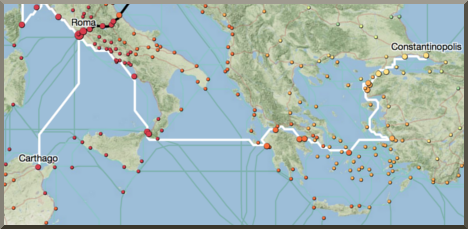
So I guess I was primed when today I read about ORBIS (http://orbis.stanford.edu/), a research and visualization tool produced by Stanford. According to the site, ORBIS "reconstructs the time cost and financial expense associated with a wide range of different types of travel in antiquity." The blogs I read spoke of its value as a research tool in the humanities, but my first thought was how it could bring the realities of ancient civilizations to life for 6th grade students!
When I taught 6th grade, I used to have students do chart paper and pencil simulations of conditions in the ancient world. They would read about climate, geography, food sources and military campaigns, and try to make sense of how those related. But I didn't have access to Google Earth at that time to show them the terrain, and I certainly didn't have access to research-based information about how long it took to get from Point A to Point B via military march, pack train, or horse relay!
![]() |
| ORBIS Screenshot - http://orbis.stanford.edu |
It is SO difficult for students to really picture the challenges faced by earlier civilizations. In the 90's, we used software like Oregon Trail, and paper simulations that used pushpins on a chart paper map and "event cards" that proposed scenarios. While those simulations helped, they were time consuming and difficult to adapt. ORBIS allows students to play with the data, exploring a variety of options and strategies. Students can then apply their research skills and use other tools such as Google Earth to think critically about the "why" of the numbers. I hope that Stanford researchers decide that ancient Egypt, India, or the Far East would make a good next project...
This almost makes me want to go back to 6th grade!
Subscribe to:
Comments (Atom)